Sorb™ · by Metatoy
“Looks right in Figma” should mean right in code.
Works with Figma. Not affiliated with, or endorsed by, Figma. Figma is a trademark of Figma, Inc.
Sorb is the design-token bridge for the running app. Propose a token change, watch your real React components re-skin live — CSS custom properties, no hand-authored mappings — then verify it before you merge.
Verified = checked against your live components’ tier/type bindings before merge — not a visual or accessibility audit.
Free while we’re in beta. Access is by request — no card, no self-serve sign-up yet.
Or request access right here.
Access is by request while we’re in beta. You’ll hear back from Nathan by email. The beta is provided as-is while we iterate — your feedback shapes it. By requesting access you agree to our Beta Terms and Privacy notice.
Two ways in
Pick your path
Same loop, two front doors. Designers drive it from Figma; developers wire it into React.
For designers
Propose a token change in Figma, watch it appear live on the real product, and confirm it's right — before it ships.
- Propose a token change in the Sorb plugin, right inside your Figma file.
- See it live in the actual React component — not a mock, not a static snapshot.
- Save a version to your project — ships it as a pull request from the dashboard.
You’ll need: The Sorb Figma plugin (we email you the zip) and a Sorb account. Sign in from the panel — your org and first project are created for you.
For developers
Two commands. Real tokens from your running app as CSS variables — live-preview proposed changes, verify before merge.
- Install the Leaf SDK and wrap your app in SorbProvider.
- Run sorb dev — the local bridge connects the Figma plugin to your running component.
- Tokens resolve to .sorb/resolved.json, auto-bind to CSS properties by type, and arrive as var(--token).
You’ll need: A React app, Node 20, and your DTCG token source.
Two commands to start
npm install @sorb/leaf @sorb/juice
sorb dev
Leaf wraps your React app and delivers tokens as CSS variables. Juice runs the local bridge server that connects the Sorb Figma plugin to your running component.
How it works
One loop: propose in Figma → preview live → save a version → ship a PR
It starts in Figma and ends in your real running product — not a mock. Step through the whole flow — pick Designer or Developer and play it end to end.
Adjust volume for narration
Get the plugin.
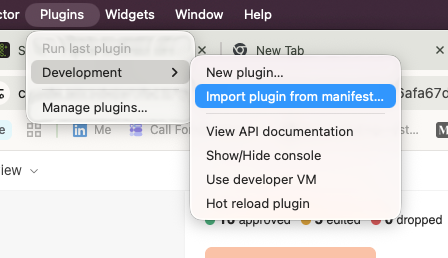
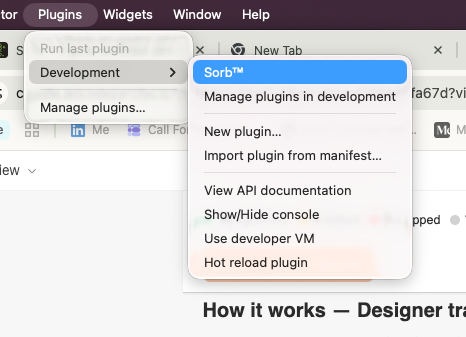
Download the zip we email you, then in Figma desktop choose Plugins → Development → Import plugin from manifest and pick manifest.json. Sorb™ then appears in that Development menu. About three minutes; no account needed yet.
Works with Figma. Not affiliated with, or endorsed by, Figma. Figma is a trademark of Figma, Inc.
Tokens travel in the DTCG format — the open standard that Style Dictionary and the DTCG community toolchain already speak, so your token file works outside Sorb too.
Features
What’s in the loop
Figma plugin
Propose token changes from a panel inside Figma — or edit your Figma Variables and the plugin picks them up. Sign in from the panel.
Live preview in the running app
Your real app re-skins in place as you type — CSS custom properties, no rebuild. A banner marks it as a preview.
Versions + Token Explorer
Save each change as a version. Browse every token in the Explorer and compare any two versions side by side.
Token version → GitHub PR
From the dashboard, turn a saved version into a pull request: one generated stylesheet, a rendered diff in the body.
Tokenize a repo
No tokens yet? Sorb scans your repo for hardcoded values and opens an additive starter-token PR, plus a Design health audit.
Hosted Storybook
Capture your Storybook once; Sorb hosts it, lists every story, and lets the preview reach the whole component set.
React SDK + local bridge
Wrap your app in SorbProvider; run sorb dev. Tokens arrive as CSS variables, live-swappable without a rebuild. No account needed, your network.
Six supported front-end frameworks
The same Sorb tokens work for React, Tailwind, Mantine, MUI, PrimeVue and Angular.
No-install tour
Six steps in your browser at try.sorbcloud.com — the real plugin and a real storefront, nothing to install or sign up for.
See it live
No install. Real product.
Two of the three panels in the tour are the real thing — the actual plugin and an actual storefront.
Coverage varies by stack — MUI themes palette, background, text, divider, and radius through CSS variables today, not typography or spacing.
vs Figma Code Connect
Complementary, not a replacement
Code Connect puts a static snippet into Figma’s Dev Mode — anchored on the Figma file. Sorb anchors on your running app: it reads what React actually renders, lets designers propose changes in Figma, and previews them live in the real component before anything ships.
| Dimension | Sorb | Figma Code Connect |
|---|---|---|
| ⚓ Anchor | Your running React app — the values it actually renders. | The Figma file — a hand-published code snippet. |
| 👁️ Live preview | Previews the real running component via the bridge. | Shows a static code string, not a running component. |
| 🧩 Token resolution / binding | Reads what the app actually renders; tokens matched to CSS properties by type. | Snippets are hand-written; no token semantics. |
| 🚀 Runtime delivery | Tokens arrive in your app as CSS variables at runtime. | Does not deliver runtime values. |
| 🔀 Versions → pull request | Every saved change is a version; compare any two and open a pull request from the dashboard. | Not present. |
| 🎯 Who it's for | Designers and developers in one loop. | Developers authoring the mappings. |
| 🧰 Framework breadth | React SDK first. Token output proven on five storefront stacks — Tailwind, Mantine, MUI, PrimeVue, Angular. | Spans several frameworks — broader. |
Comparison reflects each tool’s design anchor, not a feature-for-feature ranking. Code Connect is native to Figma Dev Mode and spans more frameworks; Sorb goes narrower and deeper on React.
Pricing
Simple pricing
Basic
Free during the beta.
The whole loop: plugin, live preview, versions, pull requests, and the React SDK with the local bridge.
Pro
Free during the beta.
Everything in Basic, plus Tokenize with Design health, hosted Storybook, and the hosted bridge.
Pricing lands at general availability.
FAQ
Common questions
What stage is Sorb at?
Free beta, by request. Ask for access on this page and Nathan emails you an invite — no card. It is not generally available yet: expect rough edges and active iteration.
Can I try it without installing anything?
Yes. try.sorbcloud.com is a six-step tour in your browser — the real plugin and a real storefront, no install, no sign-up. demo.sorbcloud.com is the reference storefront on its own.
Does Sorb work with Figma?
Yes. Works with Figma. Not affiliated with, or endorsed by, Figma. Figma is a trademark of Figma, Inc.
Is it a replacement for Figma Code Connect?
No — it's complementary. Code Connect maps a static code snippet into Figma's Dev Mode. Sorb resolves, binds, and live-previews real tokens in your running React app.
What frameworks are supported?
React, via the Leaf SDK, for live preview in your running app. Token output isn’t React-only: the same tokens run five storefronts — Tailwind, Mantine, MUI, PrimeVue, and Angular.
How is my data handled?
During the beta the hosted service stores org/project metadata and short-lived preview payloads. See the Privacy notice for what we store and for how long.
What will it cost?
Free while we’re in beta — no card. We’ll publish pricing at general availability.