Settings View
Settings holds your account controls, the connection fields for Advanced setups, and insert behavior. Most people never open the Advanced disclosure — sign-in fills it in for you.
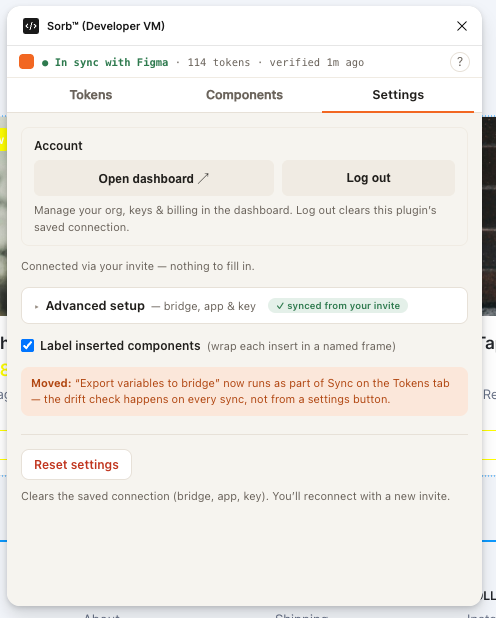
Layout at a glance
┌──────────────────────────────────────────┐
│ [Tokens]  [Components]  [⚙ Settings ▼]    │
├──────────────────────────────────────────┤
│ Account                                    │
│ [Open dashboard ↗]  [Log out]              │
├──────────────────────────────────────────┤
│ ▸ Advanced setup — bridge, app & key       │
│   (collapsed by default; ✓ synced from     │
│   your invite once connected)              │
├──────────────────────────────────────────┤
│ [✓] Label inserted components              │
├──────────────────────────────────────────┤
│ [Reset settings]                           │
└──────────────────────────────────────────┘
Account
Open dashboard opens app.sorbcloud.com to manage your org, keys, and
billing. Log out clears the plugin's saved connection (not your
account) — you'll reconnect with sign-in or a fresh invite.
Advanced setup
Collapsed by default. Once you've connected by signing in, a ✓ synced from your invite pill shows next to the summary and the fields below are already filled in — you shouldn't need to touch them.
| Field | Default | Purpose |
|---|---|---|
| Bridge origin | https://bridge.sorbcloud.com | Where the bridge is reachable — the hosted bridge by default, or http://localhost:7777 for a local sorb dev. Each of Bridge origin and App URL has an inline Test button that pings it and reports the result underneath. |
| App URL | http://localhost:5173 | The page opened by Preview in app (with ?preview=<id>). |
| Storybook URL | http://localhost:6006 | The base URL opened by Preview in Components View. |
| GitHub file | — | The edit URL of your tokens file on the target branch — where Open PR opens the web editor. |
| API key | — | A publishable key (sorb_pk_…) for the hosted bridge. Leave blank to talk to a local sorb dev instead. |
This is the same "manual bridge setup" reachable from the front door's Advanced setup before you've connected — see Connect flows.
Moved: "Export variables to bridge" now runs as part of Sync on the Tokens tab — the drift check happens on every sync, not from a settings button.
Insert behavior
Label inserted components (default on) wraps each Components View insert in a named frame — see Components View.
Reset settings
Clears the saved connection (bridge, app, key) — a two-click confirm (Reset settings → Click again to reset, arming for 3 seconds). You'll reconnect with sign-in or a new invite.
Next
Works with Figma. Not affiliated with, or endorsed by, Figma. Figma is a trademark of Figma, Inc.